How to Copy Trade on Topstep: The Complete Beginner-Friendly Guide (2025 Update)
Managing multiple Topstep accounts can quickly become stressful if every order needs to be typed manually. Because of this, many traders search for how to copy trade on Topstep in a safe, compliant way. Topstep does allow trade copying—but only when using approved tools and proper risk controls.
This guide breaks down why traders use a trade copier, what Topstep’s rules permit, and the step-by-step process for setting up copy trading on TopstepX, Tradovate, and R|Trader Pro. You’ll also learn the risks, restrictions, and best practices to protect your funded accounts.
1. Why traders want to copy trade on Topstep
Running two or more accounts at the same time is a challenge — especially when markets move quickly. Copy trading simplifies the workflow by automating the replication of trades to all connected accounts. Instead of re-entering an order multiple times, you execute once on a leader account, and every follower mirrors the position.
Copy trading also enhances consistency. When you manually enter trades, it’s easy to mismatch contract size or forget to close a position. A copier keeps everything synchronized, removes emotional mistakes, and ensures your accounts follow the same risk parameters. This is especially important for traders who want strong discipline and want to avoid breaching rules like Maximum Position Size or Daily Loss Limits.
2. Does Topstep allow copy trading?
Yes — but with strict rules. Topstep supports copy trading through its Trade Copier, available on TopstepX and specific third-party platforms. However, this is not the same as using bots, EAs, or unapproved automation, which are prohibited.
Follower accounts now support:
-
PDLL (Personal Daily Loss Limit)
-
PDPT (Personal Daily Profit Target)
When a follower hits its limit, traders can choose:
-
Liquidate: Flatten all positions and disconnect from the copier.
-
Liquidate & Block: Close all trades, block trading for the day, then resume following the next session.
Follower accounts cannot use:
-
Trade Limits
-
Symbol Blocks
-
Contract Limits
This ensures trade replication stays accurate.
Another key restriction: You cannot use the copier on Live Funded Accounts. Copy trading is only allowed between Trading Combine accounts and Express Funded Accounts.
Topstep also requires the leader account to have the smallest maximum position size; otherwise, follower accounts may exceed their limits.
3. How to copy trade on Topstep (Platform-by-Platform)
Copy trading on Topstep simply links one leader account to one or more followers. Here’s how it works across supported platforms.
3.1. Copy trading on Tradovate
Tradovate includes a Group Trade Add-On, which functions as a built-in copier.
Pros: simple to activate, Topstep-supported, works well with multiple accounts.
Cons: no ATM brackets, possible delay during high volatility.
How to enable:
-
Log in to your Tradovate platform using Topstep credentials.
-
Go to Application Settings → Add-Ons.
-
Find Group Trade and click Activate.
-
Log out and log back in.
-
Open the account list and select Manage Groups.
-
Create a group and drag your follower accounts into it.
-
Assign contract quantities.
-
Save the group.
Once configured, every order placed on the leader will instantly mirror to all linked accounts.
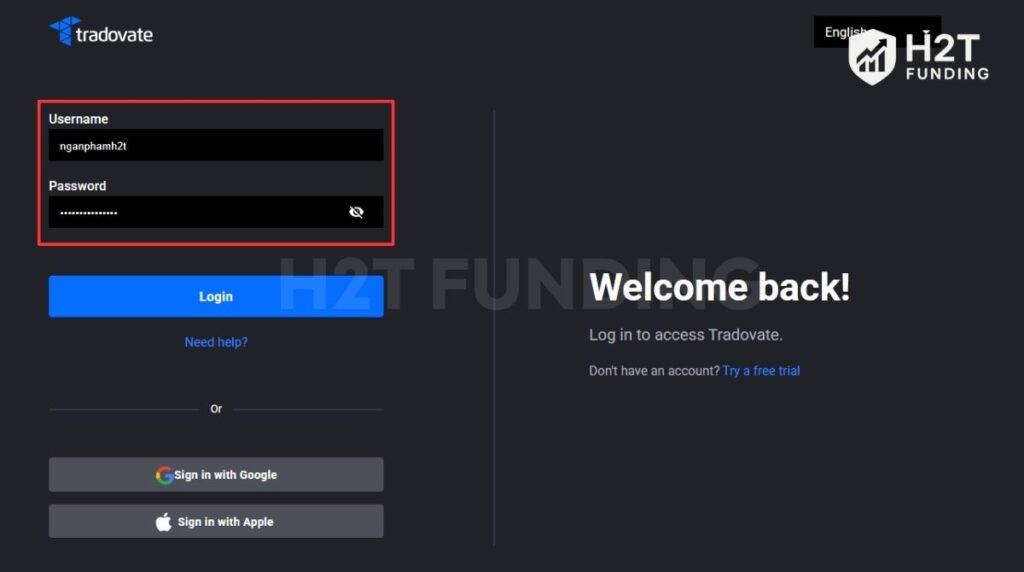 |
| Log in to your Tradovate account with Topstep credentials |
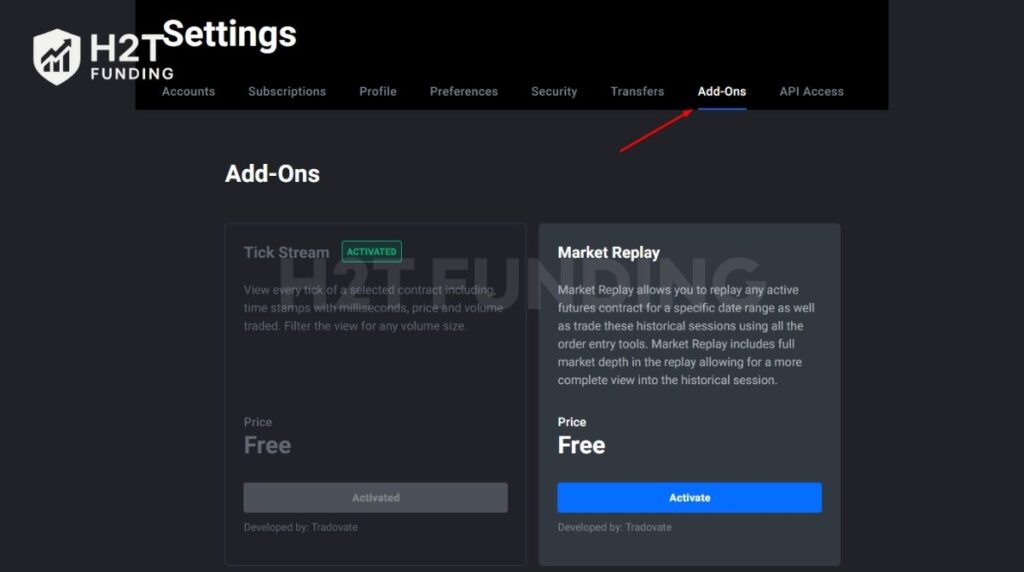 |
| Go to Application Settings → Add-Ons |
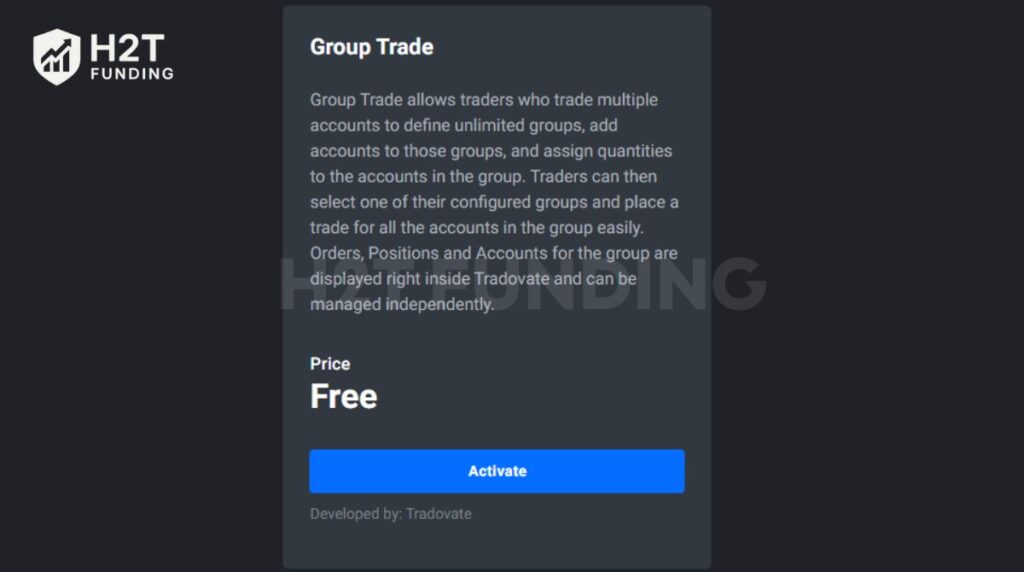 |
| Scroll down and click Activate under Group Trade |
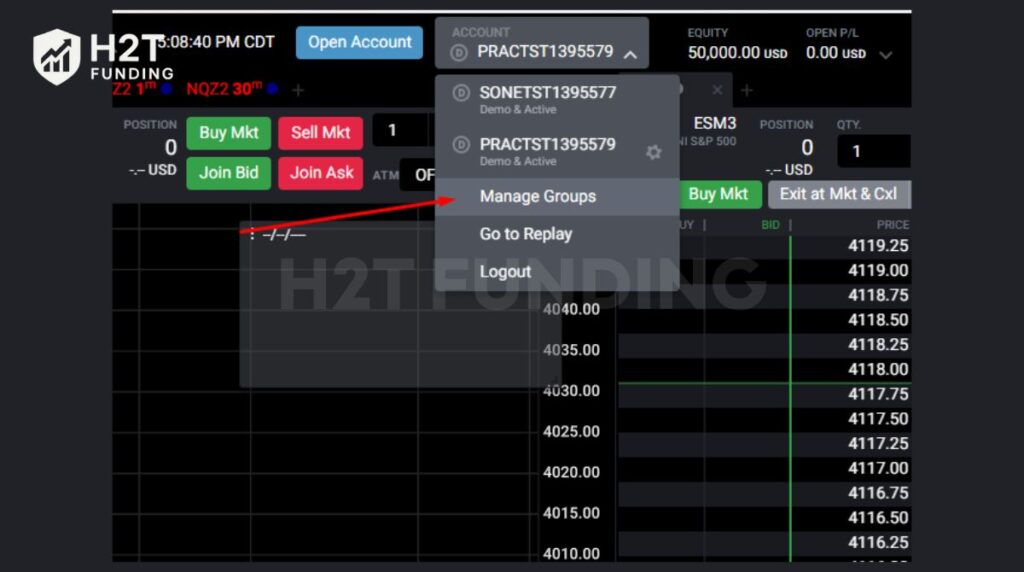 |
| In the accounts drop-down, select Manage Groups |
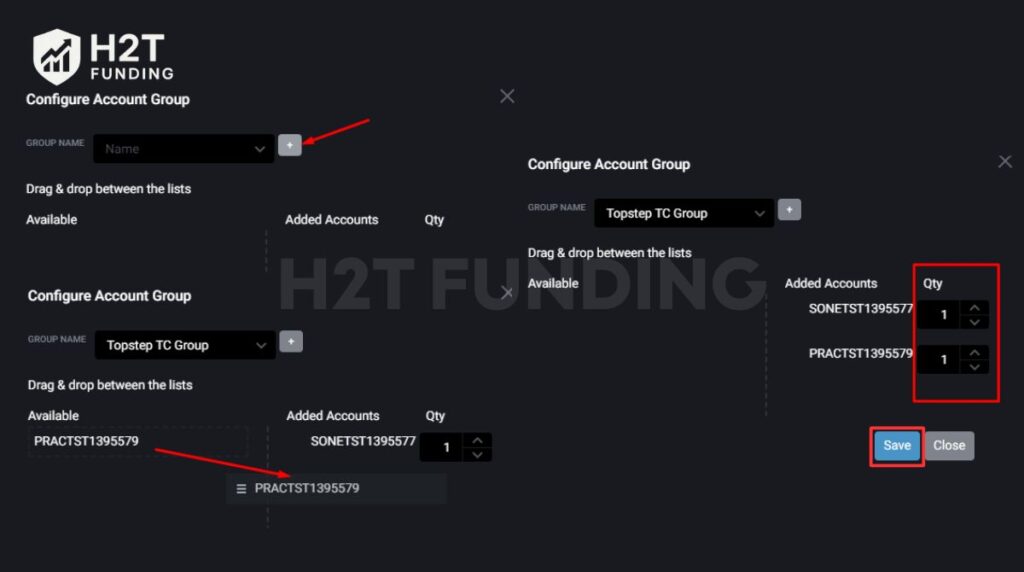 |
| Create a group and drag the accounts you want to copy trades to |
3.2. Copy trading using R|Trader Pro (Rithmic)
R|Trader Pro uses Account Templates to distribute trades across linked accounts.
Pros: detailed contract control, clear visibility.
Cons: more complex interface.
Steps:
-
Sign in with your Topstep Rithmic credentials.
-
Open Trade → Place Order.
-
Select Show More Options.
-
Enable Account Templates → Config.
-
Create a template name.
-
Add accounts and assign Qty Ratios.
-
Save the template.
-
Choose the template and keep “Close When Done” unchecked.
-
Place your trade — all accounts will replicate it.
Important update:
Since mid-2025, all new Trading Combines must use TopstepX. R|Trader Pro still works for older accounts but is not available for resets or new purchases.
4. How to set up the Trade Copier on TopstepX (Step-by-Step)
TopstepX is now the central platform for trade copying.
4.1. Installing the Trade Copier
-
Log into your TopstepX dashboard.
-
Open the Settings panel.
-
Go to the Copy Trading tab.
-
Select your Leader Account.
-
Tick the boxes next to accounts you want as Followers.
-
Click Save Changes.
-
Return to the trading screen.
All trades placed on the Leader will now sync across followers instantly.
4.2. Adding or removing follower accounts
-
Go to Settings → Copy Trading.
-
Check or uncheck the follower boxes.
-
Save changes.
-
Return to the trading workspace.
Changes apply immediately.
4.3. Setting risk parameters (PDLL & PDPT)
-
Open the settings for each follower.
-
Add a personal Daily Loss Limit.
-
Add a personal Daily Profit Target.
-
Choose an action:
-
Liquidate, or
-
Liquidate & Block
-
These tools help maintain account protection while copy trading.
4.4. Turning off the Trade Copier
-
Open Settings → Copy Trading.
-
Click Clear to remove all followers.
-
Save changes.
-
Return to the trading dashboard.
Warning:
Turning off the copier while trades are open will instantly flatten follower positions.
4.5. Using the copier on mobile
-
Open TopstepX in your mobile browser.
-
Tap the three-dot menu → Trading → Copy Trading.
-
Choose your Leader.
-
Select Followers.
-
Tap Save Changes.
All trades will now sync from mobile as well.
5. Risks & important notes for Topstep copy trading
Copy trading is powerful, but misconfiguration can cause serious violations.
Here’s what to watch for:
1. Risk tools differ on follower accounts
PDLL & PDPT available; others disabled.
2. Leader account must be smallest position size
Prevents follower breaches.
3. Copier doesn’t work with Live Funded Accounts
Only Trading Combines + Express Funded.
4. Execution differences may happen
Latency, low liquidity, and slippage can affect follower fills.
5. Hitting Daily Loss Limits force liquidation
Followers disconnect or block automatically.
6. Turning the copier off closes all follower trades instantly
Always exit trades manually first.
6. Conclusion
Learning how to copy trade on Topstep lets you streamline your workflow, improve consistency, and reduce trading mistakes—especially when managing several accounts. While the setup is simple, always test your configuration and review Topstep’s rules to avoid violations.
For more guides on prop firm rules and trading strategies, explore the full library on H2T Funding.
Link: https://h2tfunding.com/how-to-copy-trade-on-topstep/
#funding #h2tfunding #nganpham #finance #howtocopytradeontopstep #nganphamh2t


Nhận xét
Đăng nhận xét